
Engineering · Web Fundamentals · Shipping Notes
CORS, Explained Clearly: What It Is, What Triggers It, and Why It Breaks
A clear technical breakdown of CORS, what triggers it, what causes preflight, and the common and uncommon cases that make browser requests fail.
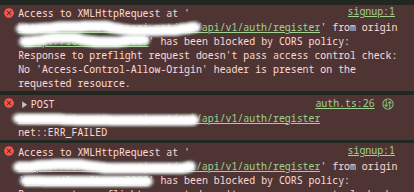
If you build web apps long enough, CORS will eventually slow you down.
A request works in Postman, but fails in the browser. A login endpoint returns 200 OK, but your frontend still acts like the request failed. An image loads fine in an <img> tag, but drawing that same image to a canvas suddenly breaks things. A file upload starts triggering preflight when all you added was a progress listener.
That is what makes CORS frustrating. It often looks random, but it is not random. The problem is that many developers learn only the surface rules and not the actual model behind it.
CORS stands for Cross-Origin Resource Sharing. It is a browser security mechanism based on HTTP headers. It lets a server say whether a different origin is allowed to access its resources. Without that permission, the browser blocks the response from being read by frontend JavaScript.
An origin is made up of three parts: scheme, host, and port. If any of those change, the origin changes.
This article explains CORS from the ground up. We will cover what it is, what triggers it, what causes preflight, the common and uncommon cases, the important headers, and the things people often mistake for CORS.
CORS is a browser rule, not a server feature
The first thing to understand is simple: CORS is enforced by the browser.
Your server does not have some special “CORS mode.” What it does is return HTTP headers. The browser reads those headers and decides whether frontend JavaScript is allowed to access the response.
That is why the same endpoint can work in Postman, curl, or a server-to-server request, but fail in the browser. Those tools do not enforce the browser’s same-origin policy the way fetch() and XMLHttpRequest do.
This is also why CORS debugging can be confusing. The server may be up. The network may be fine. The HTTP status may be 200. But the browser can still block JavaScript from reading the response because the CORS rules were not satisfied.
What counts as cross-origin
Two URLs are same-origin only when their scheme, host, and port all match.
These are different origins:
http://example.comvshttps://example.comhttps://api.example.comvshttps://www.example.comhttps://example.com:443vshttps://example.com:8443
So if your frontend runs on one localhost port and your backend runs on another, that is cross-origin. If your frontend is on app.example.com and your API is on api.example.com, that is also cross-origin. Even switching from HTTP to HTTPS makes it cross-origin.
That is why CORS shows up so often in local development.
What kinds of things use CORS
Most developers think about CORS only when calling APIs with fetch() or Axios. But CORS is used in more places than that.
It applies to cross-origin fetch() and XMLHttpRequest calls. It can also apply to web fonts loaded through @font-face, WebGL textures, and images or video frames drawn into a canvas.
That matters because not every CORS issue looks like an API issue. A font may fail to load because the asset server does not allow the page origin. An image may display fine, but once you draw it to a canvas, the browser may block pixel access or export. A CDN-hosted texture may fail inside WebGL.
So CORS is not just an API problem. It is a broader browser resource access rule.
The core mechanism
When a browser sends a cross-origin request, it usually includes an Origin header. That tells the server where the request is coming from.
The server then decides whether that origin is allowed. If it is, the server returns headers such as Access-Control-Allow-Origin.
For some requests, the browser sends the real request immediately. For other requests, it first sends a preflight request using the OPTIONS method.
That preflight is the browser asking, in effect:
“Can this origin send this kind of request with this method and these headers?”
The preflight request can include headers like:
Access-Control-Request-MethodAccess-Control-Request-Headers
If the server approves, the browser sends the real request.
So there are really two paths:
- simple cross-origin requests
- preflighted cross-origin requests
A lot of CORS issues happen because a developer thinks a request is simple, but the browser does not.
The most common things that trigger CORS
The most obvious trigger is making a browser request to a different origin using fetch() or XMLHttpRequest. If your frontend on one origin calls an API on another origin, the browser applies CORS.
Another common trigger is loading assets such as fonts from a different origin. If the asset server does not allow your site origin, the browser can block access.
Canvas work is another common source of confusion. A cross-origin image may display normally, but once you draw it to a canvas and try to inspect or export that canvas, CORS rules matter.
What triggers a preflight request
This is where many developers get tripped up.
A cross-origin request is more likely to trigger preflight when:
- it uses a method outside the simple set
- it sends headers outside the safelisted set
- it uses a
Content-Typeoutside the safelisted set
To stay in the simple path, you usually need to stick to:
GET,HEAD, orPOST- safelisted request headers
- safelisted
Content-Typevalues
1. Using non-simple HTTP methods
GET, HEAD, and POST are the familiar simple methods in CORS discussions. If you use methods like PUT, PATCH, or DELETE, the browser usually sends a preflight first.
That means your server must be ready to answer an OPTIONS request and approve the actual method through Access-Control-Allow-Methods.
This is why REST-style APIs often hit preflight by default.
2. Sending non-safelisted request headers
Some request headers are considered safelisted. If your request includes headers outside that set, the browser usually sends a preflight.
This is why Authorization often triggers preflight. The same goes for many custom headers such as:
X-API-KeyX-Tenant-IDX-Requested-With
Once you add those headers, the server usually needs to allow them explicitly through Access-Control-Allow-Headers.
3. Using Content-Type values outside the safelisted set
This is one of the most common accidental triggers.
For a cross-origin request to stay simple, Content-Type is only safelisted for:
application/x-www-form-urlencodedmultipart/form-datatext/plain
That means application/json is not simple in this context and usually causes preflight.
This is why a regular form post may work without preflight, but a JSON request to the same endpoint triggers one.
4. Attaching upload event listeners to XMLHttpRequest.upload
This is less common, but it is real.
If you attach event listeners to XMLHttpRequest.upload, the request stops being treated as simple. So if you add upload progress tracking and suddenly start seeing preflight, that may be the reason.
This catches people because they did not change the method, URL, or auth. They only added upload progress handling.
5. Using a ReadableStream as the request body
This is another uncommon trigger.
If you use a ReadableStream as the request body, the browser can force preflight. This matters more in advanced frontend networking, progressive uploads, and streaming use cases.
Credentials make CORS stricter
Cross-origin requests get stricter when credentials are involved.
Credentials include things like cookies, TLS client certificates, and some forms of authentication state.
If the browser is sending credentials, the server must explicitly allow that with:
Access-Control-Allow-Credentials: true
There is also an important restriction here:
Access-Control-Allow-Origin: * cannot be used together with credentialed requests.
If the request includes credentials, the server must return a specific allowed origin, not *.
This is why auth flows often become messy across origins. A login request may return 200, but the browser can still block frontend access if the CORS setup does not match credential rules.
The response headers that matter most
Access-Control-Allow-Origin
This is the main CORS header. It tells the browser which origin is allowed to read the response.
It can be:
*for public, non-credentialed access- a specific origin for controlled access
Access-Control-Allow-Methods
This matters for preflighted requests. It tells the browser which HTTP methods are allowed.
Access-Control-Allow-Headers
This matters when the browser wants to send non-safelisted headers. If the server does not allow them, the real request will not be sent.
Access-Control-Allow-Credentials
This matters when cookies or other credentials are involved. The meaningful value here is true.
Access-Control-Expose-Headers
This one is easy to forget.
Even if a response succeeds, frontend JavaScript cannot automatically read every response header. If you want the browser to expose custom response headers, such as pagination data or a trace ID, the server must list them in Access-Control-Expose-Headers.
Access-Control-Max-Age
This controls how long the browser can cache a successful preflight result.
That matters because preflight is an extra request. If the browser can cache the result, it may not need to ask again for every request.
A subtle but important one: Vary: Origin
If your server returns different Access-Control-Allow-Origin values depending on the incoming Origin, it should also return:
Vary: Origin
This tells caches that the response depends on the request origin.
Without it, a cache may reuse a response meant for one origin and serve it to another. That can create inconsistent CORS bugs that feel random.
Common CORS breakages developers run into
One common failure is simply missing Access-Control-Allow-Origin. If the browser expects it and does not see it, access is blocked.
Another common failure is not handling OPTIONS correctly. If your request triggers preflight, the browser sends OPTIONS first. If the server or proxy does not answer that properly, the real request never happens.
Another common issue is forgetting to allow the headers the client is actually sending. A frontend adds Authorization or a custom header, but the backend CORS config still allows only a narrow set.
Redirects can also cause trouble. A cross-origin request may fail if it is redirected to another external origin in a way the browser does not allow.
Another issue appears in local testing when someone opens an HTML file directly from disk using file:///. CORS requests are designed for HTTP and HTTPS, so that setup can fail in confusing ways.
Things people call “CORS” that are not actually CORS
This part matters because bad diagnosis leads to wasted time.
Mixed content is not CORS. If your page is loaded over HTTPS and it tries to call an HTTP endpoint, the browser blocks that for security reasons. That is a mixed-content problem.
CORP is not CORS. Cross-Origin-Resource-Policy is a different browser policy with a different purpose.
Timing-Allow-Origin is also separate. It controls whether cross-origin resource timing data is exposed through the Resource Timing API.
So not every browser error that mentions “cross-origin” is actually a CORS issue.
Why simple requests feel inconsistent
Developers often ask, “I am only doing a normal POST. Why did the browser suddenly start preflighting?”
The answer is that “simple” has a strict technical meaning here. A request may look normal to you, but still stop being simple because of one detail, such as:
Content-Type: application/json- an
Authorizationheader - a custom header
- an upload progress listener
That is why two requests that look similar in app code can behave very differently in the browser.
A practical mental model
Think of CORS this way.
For a basic cross-origin request, the browser is asking:
“May this origin read this response?”
For a more sensitive one, the browser first asks:
“May this origin send this method with these headers?”
That second question is preflight.
Once you understand that, CORS becomes easier to reason about.
Debugging CORS properly
When debugging CORS, go in this order.
First, confirm that the request is actually cross-origin by comparing scheme, host, and port.
Second, check whether the browser is sending a preflight OPTIONS request. If it is, debug that response first.
Third, inspect the request shape. Ask questions like:
- Are you using
PUT,PATCH, orDELETE? - Are you sending
Authorization? - Are you sending
Content-Type: application/json? - Are you using custom headers?
- Are you tracking upload progress through
xhr.upload? - Are you using a streaming request body?
Fourth, check whether credentials are involved. If they are, Access-Control-Allow-Origin: * is not valid.
Fifth, check for redirects, protocol issues, and local file:/// setups.
Finally, read the browser console. Your JavaScript code often gets only a generic failure, but the browser tools usually show the real reason.
The uncommon triggers worth remembering
Most developers know about custom headers and application/json. Fewer remember these:
- Upload listeners on
XMLHttpRequest.uploadcan force preflight. - A
ReadableStreamrequest body can force preflight. - Fonts, WebGL textures, and canvas-related resources can hit CORS too.
- A response may succeed, but your frontend still cannot read custom response headers unless they are exposed.
- Missing
Vary: Origincan create cache-related bugs that feel random.
These are the kinds of details that make CORS feel unpredictable when it is really just being strict.
Final thought
CORS is there to stop one origin’s frontend code from silently reading another origin’s resources unless the server allows it.
Once you understand that, CORS stops feeling mysterious. The browser is enforcing a security contract.
The practical rule is simple: know what makes a request cross-origin, know what triggers preflight, know when credentials make the rules stricter, and do not confuse CORS with other browser protections.
When you understand that model, CORS becomes much easier to debug.